



Production managers: does your tube cutting software meet your workshop’s requirements?
Whether you are considering investing in CAD/CAM software for tube cutting or want to assess your current solution, these 10 questions will help you identify what really makes a difference in production.

For many years, programming a tube cutting machine mainly meant generating an NC program to cut round or square tubes.
Today, fabrication shops need to produce a wider variety of parts on increasingly versatile and potentially more complex machines. Production managers also have to deal with tight deadlines and raw material costs that fluctuate and regularly increase.
In this context, CAD/CAM software for tube cutting can become a real driver of production performance. Yet many subcontractors and manufacturers continue to use software that was selected years ago, without considering whether it really takes full advantage of their machine’s capabilities.
To help you assess your situation, we have identified 10 questions every production manager should ask before investing in tube cutting software or deciding to keep their current solution.
1. Can the software easily program all your tube parts, or only the simplest ones?
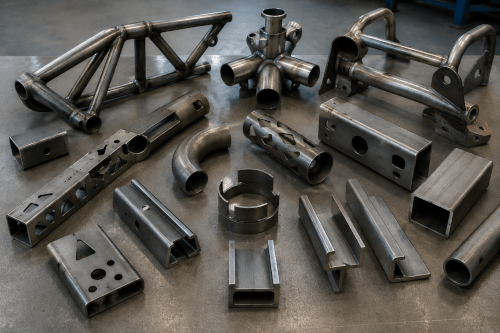
Round and square tubes often represent only part of production. As geometries become more complex, some software solutions reach their limits and require more manual intervention.
The expert advice
Good CAD/CAM software should make it just as easy to program tubes as H, U, T and L profiles or other complex sections. If certain types of parts are systematically assigned to your most experienced programmer, this may be a sign that your software is reaching its limits.
2. Are you using your tube cutting machine to its full potential?
Tube cutting machines are becoming increasingly powerful, with multiple chucks, moving supports, additional axes and new cutting capabilities. Does your software allow you to take full advantage of them?
The Expert advice
In many fabrication shops, some machine capabilities remain underused or are not used at all because the software cannot manage them efficiently. Your software should never become the limiting factor of your machine.
3. Do your programmers still make too many manual adjustments?
Every manual adjustment increases programming time and the risk of errors.
The Expert advice
The more repetitive tasks your software can automate, the more time your programmers can spend on genuinely complex parts. Automation is no longer just a convenience. It is a direct driver of productivity.
4. Are collisions detected before production, or on the machine?
As you know, discovering a collision during machine testing always costs more than detecting it during programming.
The Expert advice
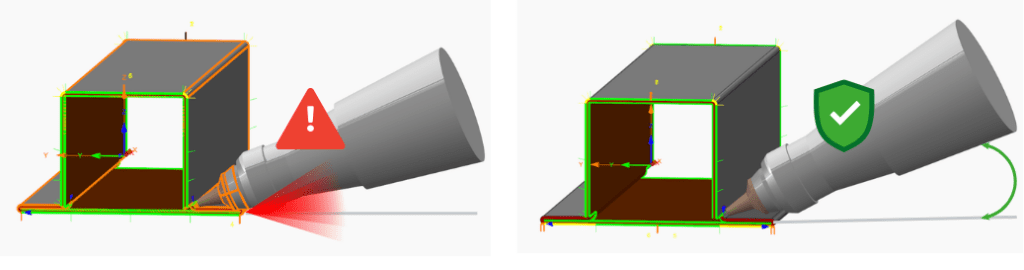
Realistic and complete simulation of your tube cutting machine helps identify potential problems before the NC program is sent to the shop floor, reducing the risk of production downtime. The most advanced solutions can also make automatic adjustments to avoid collisions without requiring intervention from the programmer.
5. Are your cutting toolpaths really optimized?
A toolpath that works is not necessarily an efficient one.
The Expert advice
An efficient cutting toolpath involves much more than simply connecting cutting contours. The software should optimize movements, lead-ins, rotations and common-line cuts to reduce cycle times while maintaining high cut quality.
6. Can your software handle every tube cutting project?
Fabrication shops sometimes turn down a project because they assume their machine cannot produce the parts, when the real limitation is actually the software.
The Expert advice
When certain geometries seem impossible to program, it is worth checking whether the limitation really comes from the machine or from the software used to program it.
7. Would changing machine brands also mean changing your software?
Many manufacturers discover that they have become dependent on a machine manufacturer to the point where changing machine brands also means changing their CAD/CAM software.
The Expert advice
Independent CAD/CAM software that is compatible with different brands of tube cutting machines makes it easier to develop your machine fleet over time and gives you greater freedom when making future investments.
8. Does your tube cutting software integrate easily with your digital system?
ERP, MES, quotation systems, CAD, document management… Does data flow smoothly between your systems, or do you still rely on manual data entry and transfers?
The Expert advice
The more data flows automatically between your systems, the fewer duplicate entries, errors and delays there are between the programming office and the shop floor.
9. Is your software a competitive advantage, or simply a habit?
Many companies have been using the same software for ten or fifteen years without questioning whether it is still the best solution for their production needs.
The Expert advice
Productivity gains rarely come from a single factor. However, more powerful CAD/CAM software can improve programming efficiency, material usage, cycle times, quality and your ability to take on more demanding projects.
10. Is your software provider simply a supplier, or a real partner?
The best software providers do more than respond to support tickets. They also share best practices, introduce useful new capabilities and help their customers adapt as their production requirements evolve.
The Expert advice
Ask yourself a simple question: if your production stops tomorrow morning, do you know who to call, and are you confident in the answer you will receive?
If you answered “no” or “I don’t know” to several of these questions, it may be time to take an objective look at your tube cutting programming environment.